Skip to content
NewNow with a desktop app

The agentic development environment that scales with you.

A free, open-source ADE for Claude Code and Codex. Start with one agent, grow into a software factory.

  • Claude Code
  • Codex
  • GitHub
  • + more agents later
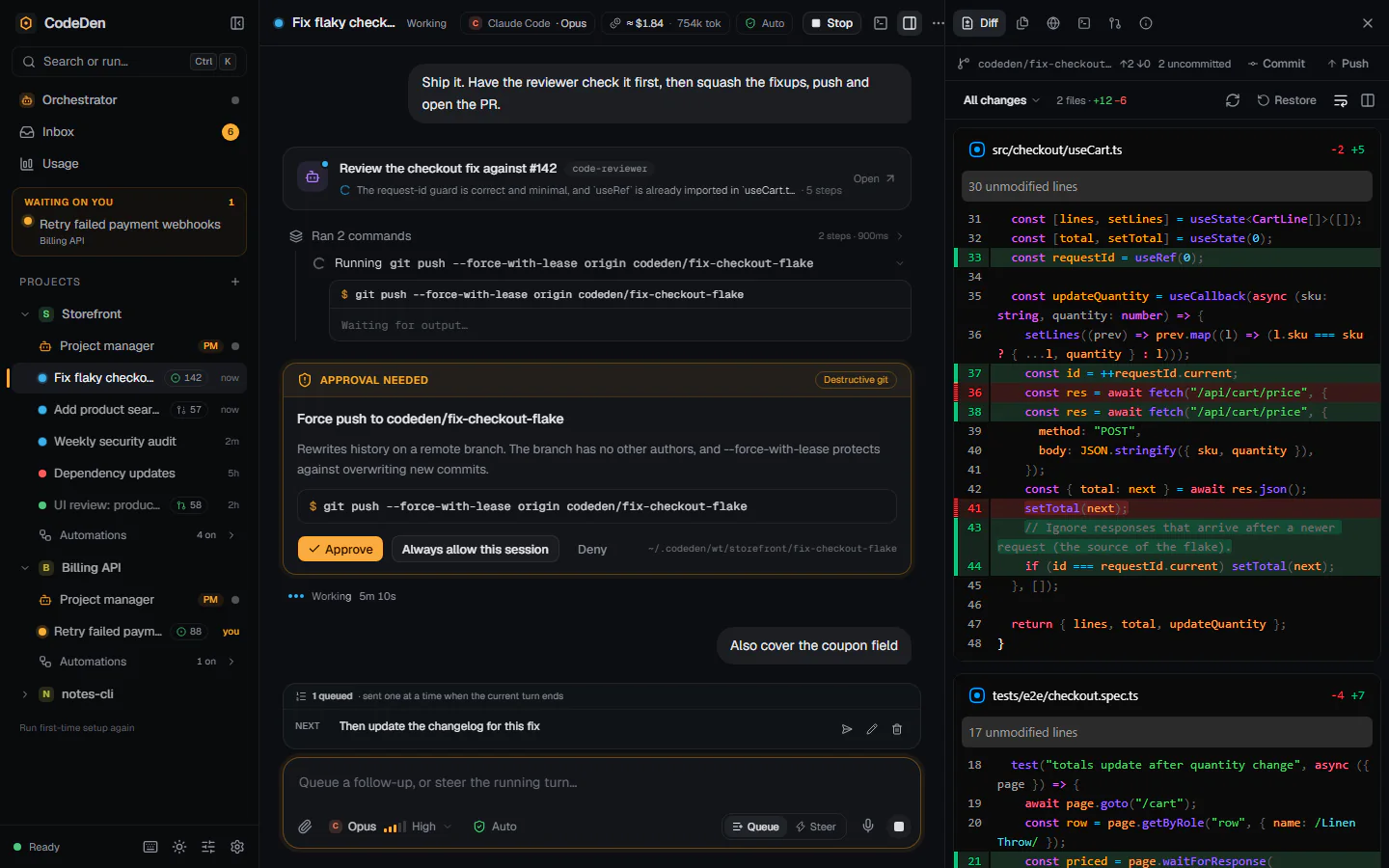
CodeDen with several projects and agent sessions in the sidebar. The open session shows a reviewer subagent, a running git command, an approval request for a force push and a queued follow-up message, with the diff of two changed files on the right.

CodeDen in a minute

Start with one agent. Grow into a factory.

Drive

Work hands-on, with everything in view.

Chat with Claude Code or Codex and see every tool call and every diff. Risky actions wait for your OK.

  • Every turn is a checkpoint you can restore
  • Each session gets its own branch, so your checkout stays clean
  • Pick the agent, model and effort for each session
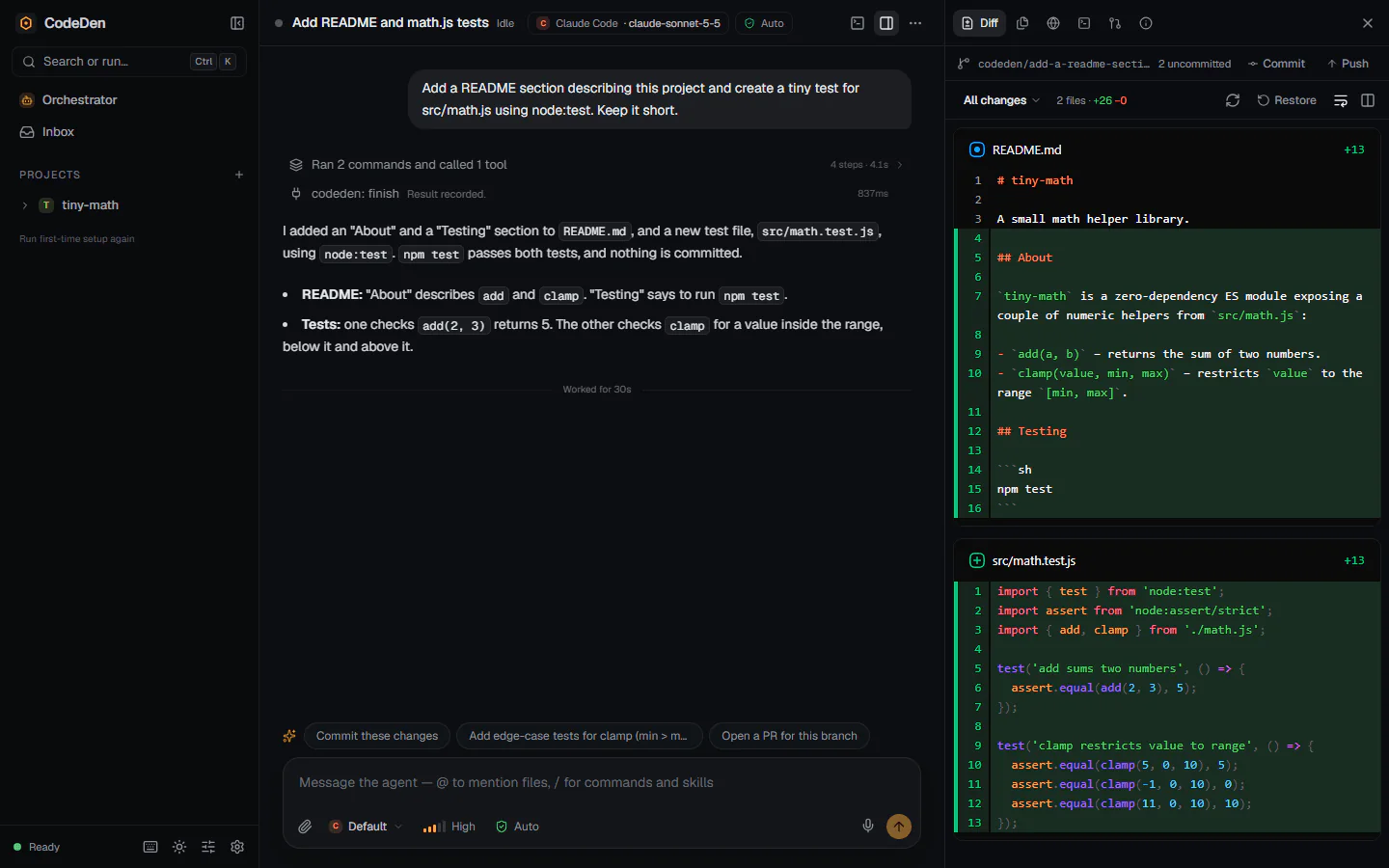
A CodeDen session: the agent's summary of its work and suggested next prompts on the left, and the diff of README.md and a new test file on the right.
  • Terminal
  • Files
  • Memory and skills
  • MCP servers
  • Voice
  • Image generation

Delegate

Run many agents at once. Answer only what matters.

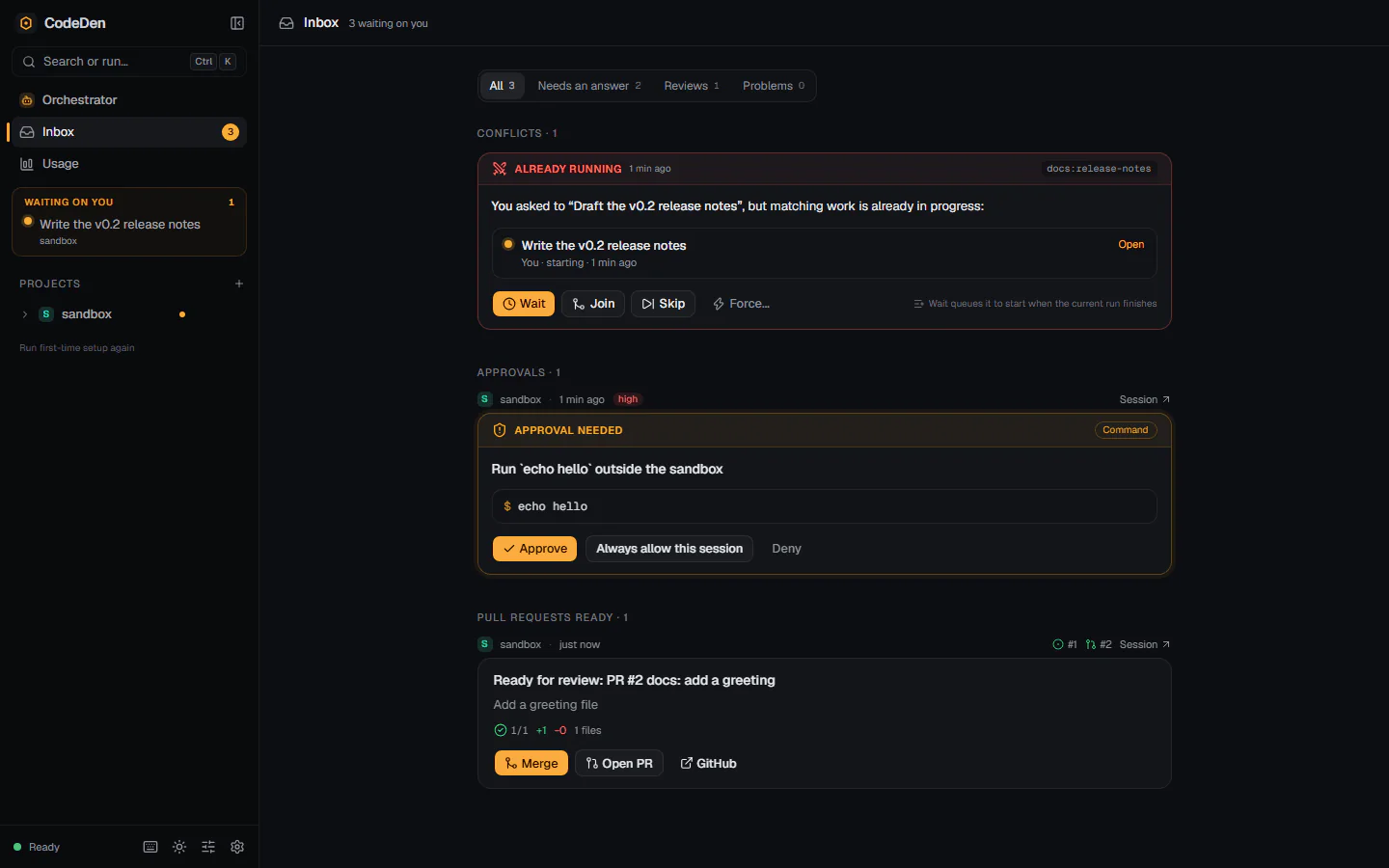
Each agent works on its own branch. Questions, approvals and finished pull requests land in one inbox.

  • Project managers pick up GitHub issues and start the work
  • Pull requests link their issue, with screenshots and test results
  • Or just tell the orchestrator what you want
The inbox: a notice that the same work is already running with Wait, Join, Skip and Force, an approval request for a shell command, and a pull request ready to merge.

Automate

Put recurring work on a schedule.

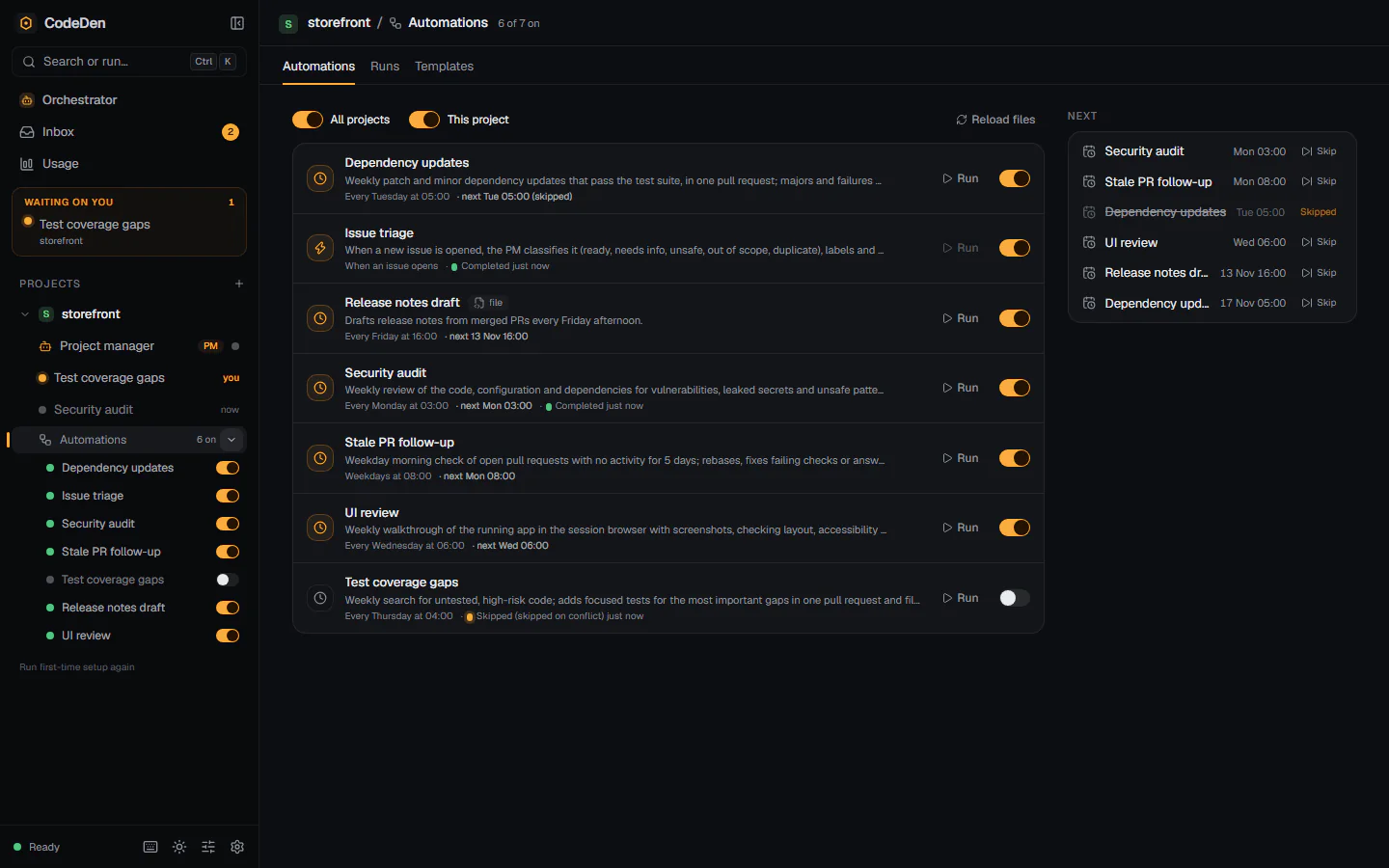
Turn a prompt into a job that runs on a schedule or a GitHub event. Every run is a normal session you can read.

  • Templates for security audits, dependency updates, triage and more
  • Pick the agent, model and effort for each job
  • Quiet hours and daily caps, and everything starts switched off
A project's automations: seven jobs with their schedules, Run buttons and switches, and a Next panel listing upcoming runs with Skip buttons.

Factory

Let a software factory work through your backlog.

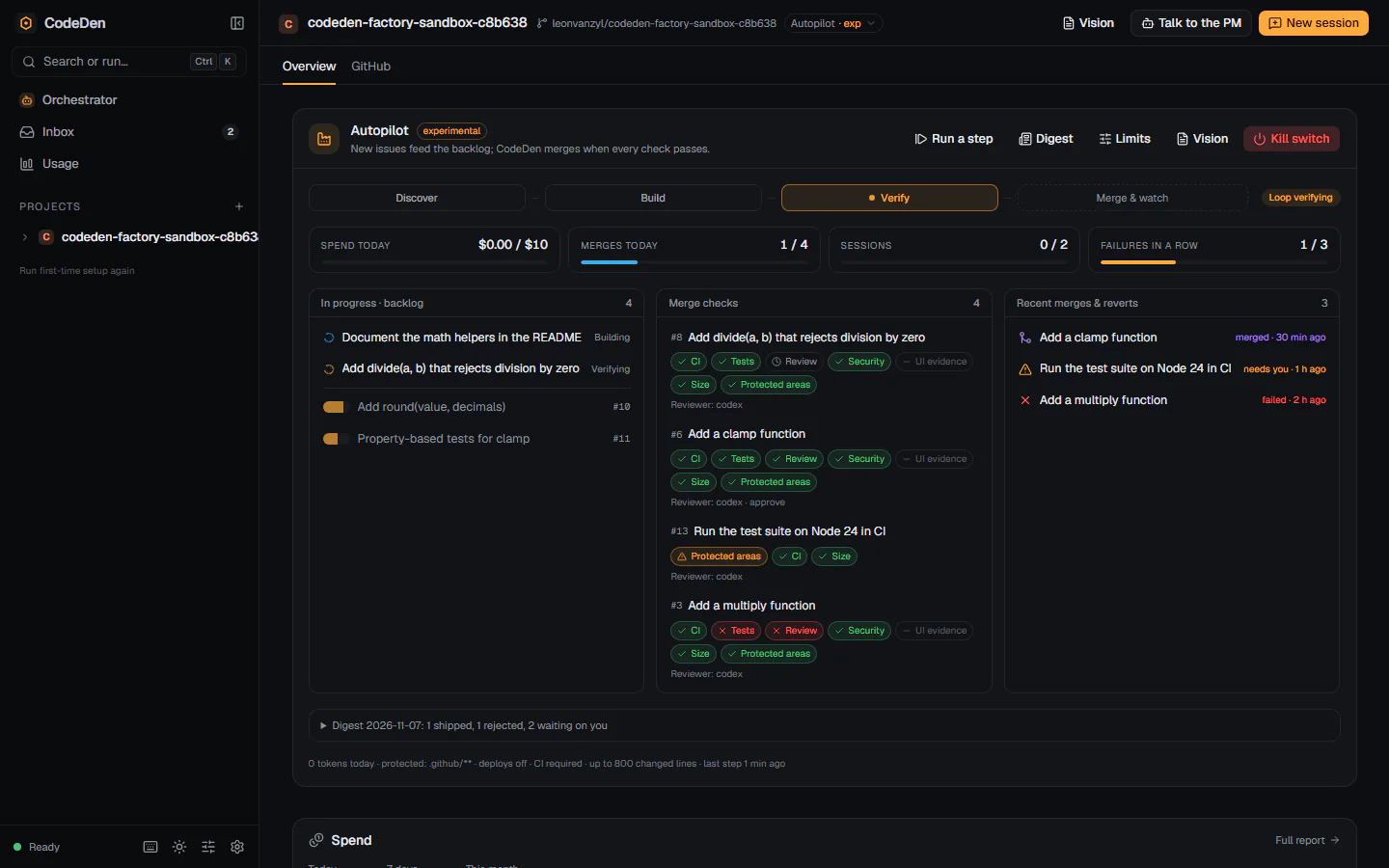
CodeDen picks up issues and failing checks, builds the fix and merges only when every check passes.

  1. Manual

    You drive every session.

  2. Assisted

    Agents help, you merge. The default.

  3. AutopilotExperimental

    CodeDen builds new issues and merges when checks pass.

  4. Dark factoryExperimental

    It also finds the work, guided by your vision.

The factory panel in Autopilot: loop stages Discover, Build, Verify and Merge & watch, meters for spend, merges, sessions and failures, the backlog, merge checks per pull request and recent merges and reverts.
  • Green CI and tests before any merge
  • An independent review by a second agent
  • Protected areas it never merges on its own
  • A daily budget and hard limits
  • Automatic revert if a merge breaks CI
  • A kill switch and a daily digest

Autopilot and Dark factory are experimental, so try them on a sandbox repository first. How the factory works

Your subscription

Use the logins you already have.

CodeDen runs your own Claude Code and Codex, subscriptions included. It never resells tokens, and shows you what the work costs.

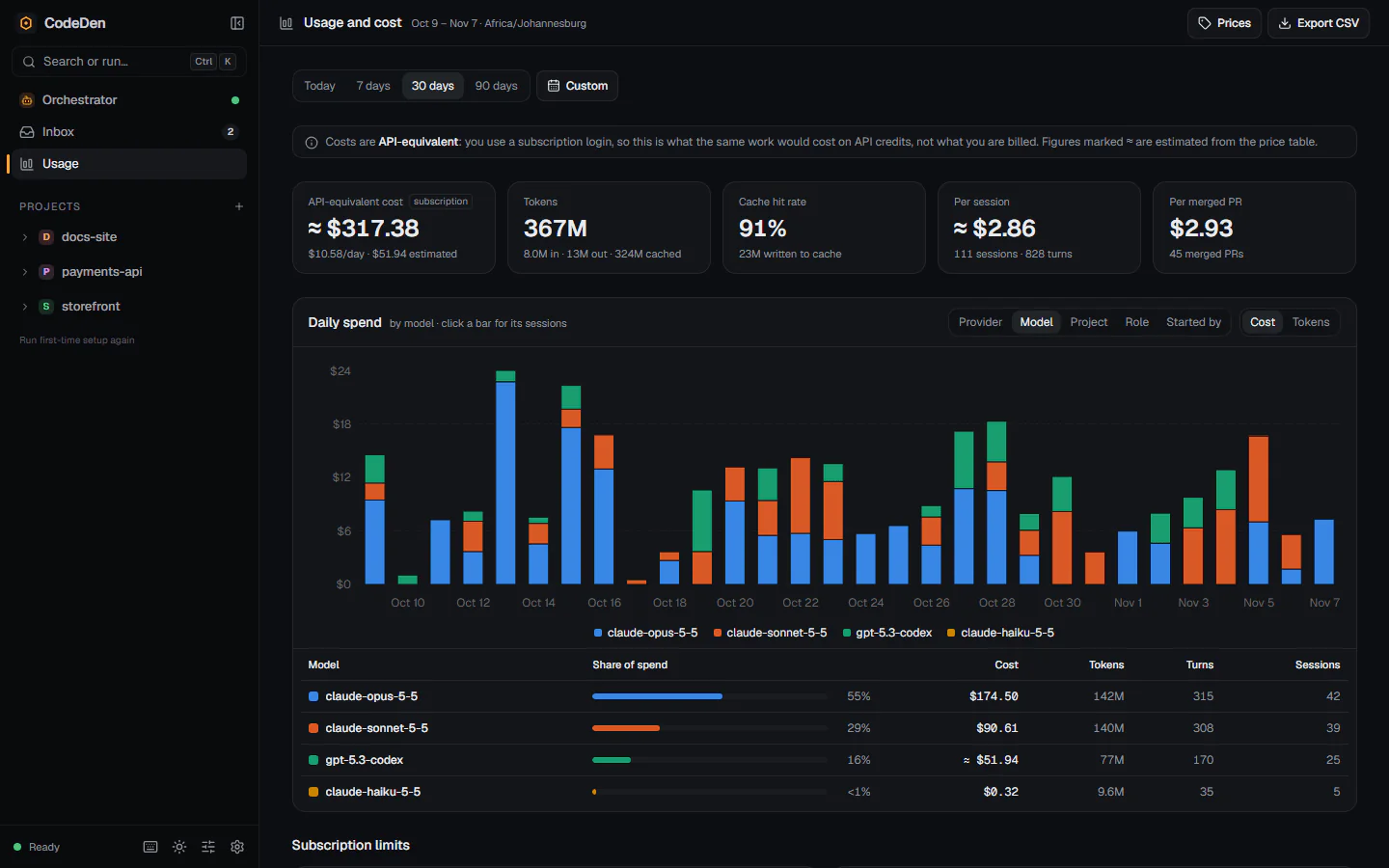
  • Cost and tokens by project, model and session
  • API-equivalent cost for subscription logins
  • Budgets and rate-limit alerts
The usage and cost report for 30 days: API-equivalent cost, tokens, cache hit rate, cost per session and per merged PR, a daily spend chart stacked by model and a per-model breakdown table.

Your code, your machine, your keys.

  • Runs on your machine

    No accounts, no telemetry, no hosted backend.

  • Your keys stay yours

    Secrets live in your OS keychain, never in files.

  • Open source, MIT

    Read every line, fork it, or send a pull request.

Coming later

Next: scale beyond your laptop.

Run your agents somewhere else, so the factory keeps working with your laptop closed. Not in the current release yet.

  • A cloud machine
  • Your own server
  • Docker

Get CodeDen

Free for Windows, macOS and Linux. The desktop app updates itself.

Checking for the latest release...

Prefer the terminal? With Node.js 24+:

npx codeden

You'll also need git, and Claude Code or Codex signed in.

The builds aren't code-signed yet. On Windows choose More info, then Run anyway; on macOS right-click CodeDen and choose Open. Desktop app guide · Release notes

Questions, answered.

Is CodeDen really free?
Yes. It's open source under the MIT license, with no accounts and no paid tier.
Do I need API keys?
No. CodeDen uses your Claude Code and Codex logins, subscriptions included. Check your provider's terms for how your plan may be used.
Where does my data go?
It stays on your machine, in ~/.codeden/. There's no hosted backend and no telemetry.
Do I have to use the factory?
No. Most people start by running sessions themselves. Automations and the factory stay off until you turn them on.
Will agents touch my working copy?
No. Each session works on its own branch in a separate git worktree, so your checkout is never touched.
Does it work without GitHub?
Yes, for hands-on sessions, parallel agents and automations. Issues, pull requests and the factory need GitHub.
Is the dark factory safe to leave running?
It's experimental and merges into your default branch, so start with Autopilot on a sandbox repository with a budget and protected areas. Read the guide first.
Why does Windows or macOS warn me when I open it?
The installers aren't code-signed yet: choose More info, then Run anyway on Windows, or right-click and Open on macOS. Until then the macOS app can't update itself, so download new versions here.
Desktop app or npx codeden?
Either: both run the same CodeDen on the same data. The desktop app adds a tray icon, notifications and automatic updates, and doesn't need Node.js.
Which agents does it support?
Claude Code and Codex today, side by side. More are planned.

Start with one agent. Scale when you're ready.